Posts
Posts


Custom Themes in Reaper (OSX)
I usually stick with default themes; in my experience, custom themes usually degrade with time...a release comes out, the original developer no longer has time, the audience isn't quite sure how to maintain.
In the case of Reaper, I have found that track layouts are really oriented around sound / recording sound.
MIDI isn't quite the focus. I don't need inputs, pan, volume, or any of the more recording oriented buttons that one might use. So I decided to create a mod to the default theme.
Setup:
Non-Retina MacBook Pro (i7)
OSX 10.8 (Mountain Lion)
Reaper 4.32
1. Themes are stored in the Color Themes folder
Open up a finder window, and from your "home" folder, navigate to:
~/Library/Application Support/Reaper/ColorThemes

2. Duplicate the default reaper theme
I am opting to use the default theme as the basis for my mod...but really any mod would do.
I select Default_4.0ReaperThemeZip, Copy (⌘C) and Paste (⌘V).

3. Rename duplicated theme to .zip
Now that we have a copy of the default theme, we need to modify it! A theme file is just a zip, so we need to unzip. First, I rename Default_4.0 copy.ReaperThemeZip to crufty_midi_temp.zip

4. Open .zip file, rename & move contents to ColorThemes folder
Once renamed as a zip fie, I double click on the zip file to 'unpack' the theme folder--this will create a crufty_midi_temp folder.

Inside the crufty_midi_temp folder, we find the 4.0 theme we're going to use as the basis for our tweaks.


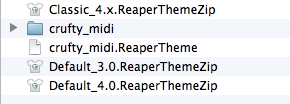
To reduce conflicts--and I'm not sure if this is required, but its what I did--I rename the Default_4.0_unpacked folder to crufty_midi. Default_4.0_unpacked.ReaperTheme gets renamed to crufty_midi.ReaperTheme.

Next, I cut (⌘X) both these items, navigate to the parent Color Themes Folder, and paste (⌘V). I delete the crufty_midi_temp folder, as well as the crufty_midi_temp.zip file--these are no longer needed.
Done! I now have a baseline for any theme mods I need to make! I can edit crufty_midi.ReaperTheme in TextEdit to my hearts content.